INSIM App
An integrated power electronics design platform — schematic capture, SPICE simulation, magnetics design, and FEM analysis in one browser-based workspace.
Schematic Editor
Draw circuits, simulate, and generate SPICE netlists.
A fast schematic editor with a built-in SPICE simulation engine. Draw your power converter, run transient or AC analysis, and view waveforms — all client-side via ngspice compiled to WebAssembly. No installation, no server round-trips.
Schematic Capture
- Component library — resistors, capacitors, inductors, MOSFETs, diodes, voltage sources
- Orthogonal wire routing with automatic grid snapping and net propagation
- One-click SPICE netlist generation from your schematic
- Multi-selection, group move, copy-paste, and rotation
SPICE Simulation
- Client-side ngspice compiled to WebAssembly — no server, no installation
- Transient, AC, and operating point analysis
- Interactive waveform viewer with multi-pane layout and FFT mode
- Editable netlist with real-time re-simulation
Magnetics Designer
Design, simulate, and optimize magnetic components.
A professional magnetic component design platform. Link an inductor or transformer from your schematic, explore thousands of core-wire combinations with the automated design adviser, and validate with full FEM field solutions — all driven by your actual circuit waveforms.
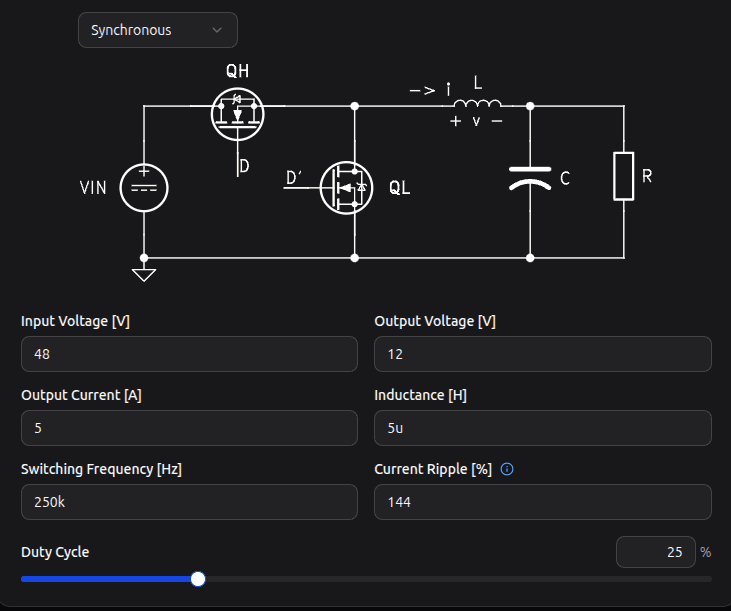
Schematic-Linked Design
Draw your power converter, simulate, and link inductors directly to the magnetics designer.
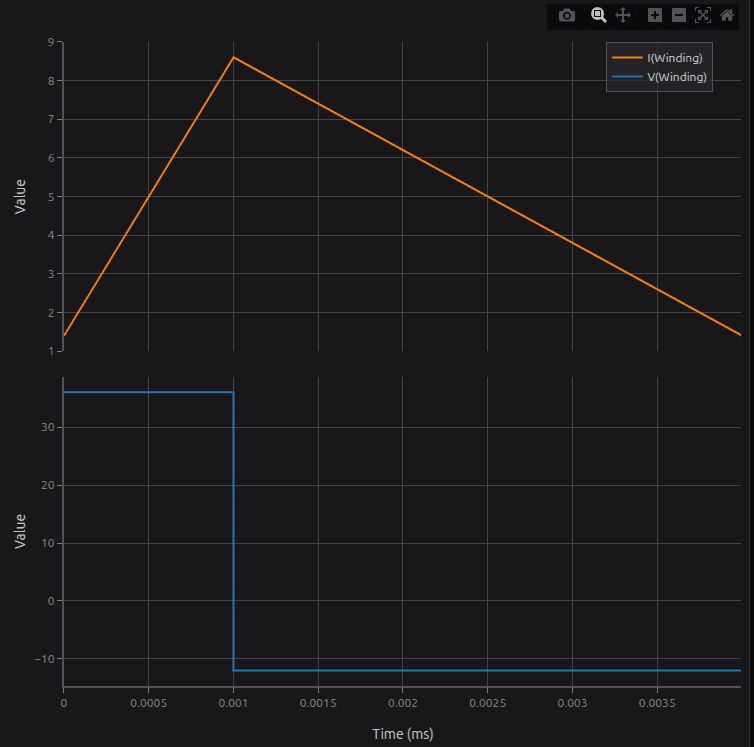
Waveform Analysis
Visualize inductor current ripple and voltage stress across the full switching period.
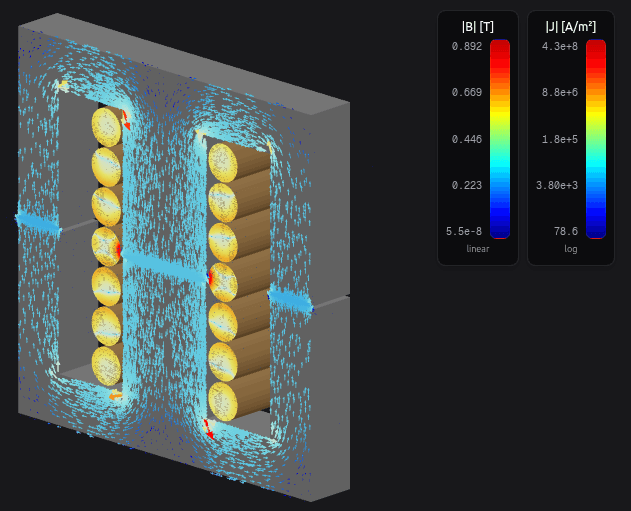
3D FEM Field Solution
Coupled magnetic flux density (|B|) and current density (|J|) solved on your actual core and winding geometry.
Waveform-Driven Design
- Link an inductor or transformer directly from your schematic
- Actual circuit waveforms drive all loss and thermal calculations
- Waveform snapshots persist across sessions — no need to re-simulate
Automated Design Adviser
- Evaluates thousands of core, material, and wire combinations
- Multi-objective optimization — loss, temperature, volume, saturation margin
- Configurable constraints — max loss, max temp rise, fill factor, B_max
3D Geometry & FEM
- Interactive 3D core and winding visualization
- Magnetostatic and harmonic finite element analysis
- Flux density, field intensity, and current density field maps
Loss & Thermal Analysis
- Steinmetz and iGSE core loss with temperature-dependent scaling
- AC winding loss — proximity effect, skin effect, harmonic-by-harmonic
- Iterative thermal-loss convergence for accurate temperature prediction
- Full loss breakdown: core vs. winding, DC vs. AC